
UI in R Studio
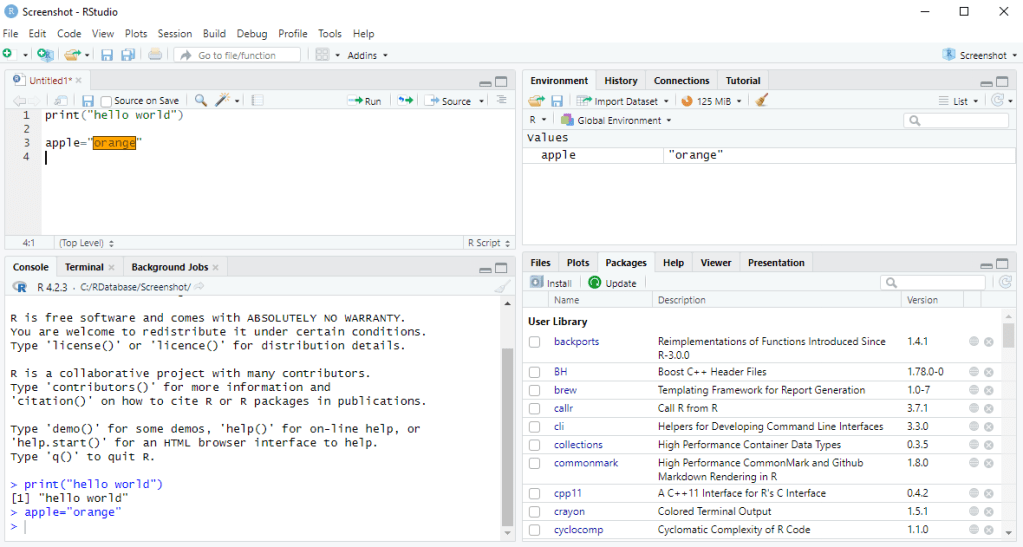
- .R File – R script saved location
- Console – code being executed
- Environment – variable saved in memory
- File/Plot/Package/Help – Different functionality like viewing file in explorer, help documentation of script, Cran list of library.
Code
Code reusability, introduce “package”, which is a public directory from CRAN.
library(MBA)also similar to
import java.io;Operation
+,-,*,/,%% → Basic Maths operators
first *, / later +, – → Operator Precedence
=, ->, <-, assign → variable declarations
rm(<<variable name>>), remove(<<variable name>>) → remove a variable
class → to tell datatypes(numeric,integer,character,logical,date)
is.<<datatype>>(<<variable name>>) → checking/testing/validation the data type
as.<<datatype>>(<<variable name>>) → convert the data type
: → range x:y, sequence number for x to y
seq(from,to,by) → range from:to, sequence number for x to y, but can interval “by”
c(5,10,1) → array aka vector, index start from 1 (not 0), c also known as “combine”
names(<<variable name>>)=c(“one”,”two”,”three”) → gave index name to array
runif(n, min, max) → generate n random number
sample(min:max, n, TRUE/FALSE) → generate n random number, True/False for repeating number appearing


Leave a Reply