
Category: Module – ABAV
-
Advanced Business Analytics and Visualization
Day 42 Day 43 Day 44 Donut Chart Day 45 (1) , 45 (2) , 45 (3) , 45 (4) , 45 (5) Bump ChartWaterfall ChartPareto ChartLollipop ChartChart Parameter Day 46 Tableau Storyboard Day 47 Exploratory Data Analysis (EDA) Day 48 Decision Tree Day 49 Linear RegressionImputationTransformation Day 50 Neural network Day 51 High performance…
-
Day 47
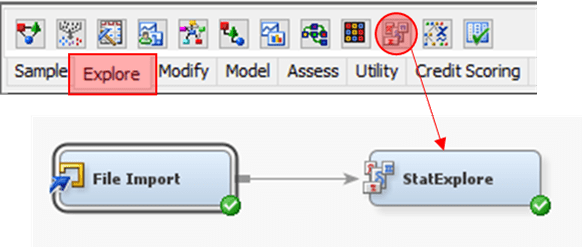
Exploratory Data Analysis (EDA) 1. Configure dataset Role accordingly 2. From Explore tab, drag StatExplore node3. Link nodes as shown4. Run StatExplore Result Tips Replace value in column using Replacement and Impute 1. From Modify tab, drag Replacement and Impute node2. Link nodes as shown 3. Configure Replacement node accordingly 4. in Replacement Editor for…
-
Day 45 (5)
Parameter 1. Click on “Age” to create Bins In Edit Bins [Age]2. Instead of fix size bin, select Create a New Parameter In Create Parameter3. Update the field accordingly 4. “Age (bin)” to Columns5. “Count” to Rows6. For parameter “Bin Size for Age” select Show Parameter7. At right side of pane, drag slider to modify…
-
Day 45 (4)
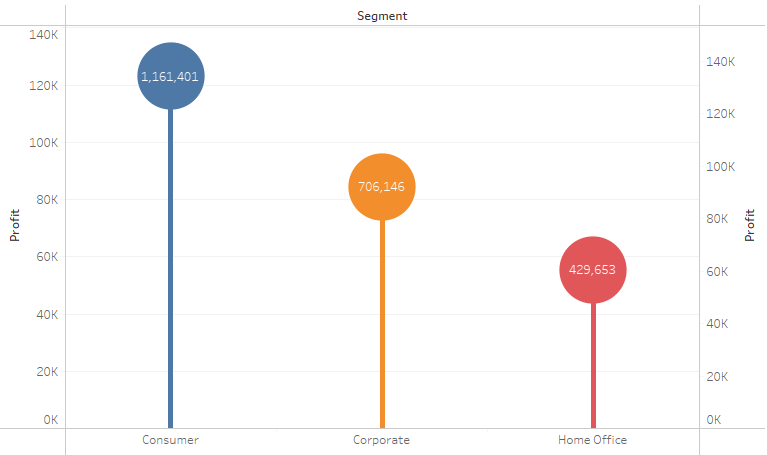
Lollipop Chart Tableau Note:– Overlay technique 1. “Segment” to Columns2. “Profit” to Rows3. “Segment” to Color 4. Do “Profit” again but this time Marks Circle 5. Combine 2 plot together using Dual Axis Spotfire Note:– In Combination Chart, no capability to set Color by attribute, only by series– no capability to create circle; hack using…
-
Day 45 (3)
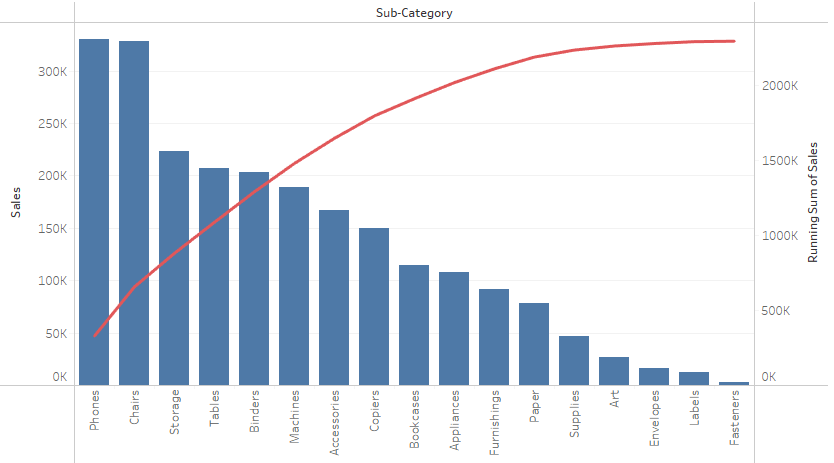
Pareto Chart Tableau Note:– Overlay technique 1. “Sub-Category” to Columns2. “Sales” to Rows 3. Click on “Sub-Category” and select Sort…4. In the Sort Menu, Change to Sort by Field, Sort Order Descending and Field Name is Sales. 5. Do “Sales” again but this time Marks Line 6. Combine 2 plot together using Dual Axis Spotfire…
-
Day 45 (2)

Waterfall Chart Tableau Note:– Uses starting position of Grantt Bar as anchor, negative value of size to expand the bar 1. “Order Date” to Columns2. “Sales” to Rows 3. Bar chart cannot be use as it always start from “0” aka bottom of chart4. Grantt Bar however started at the value itself, only missing link…
-
Day 45
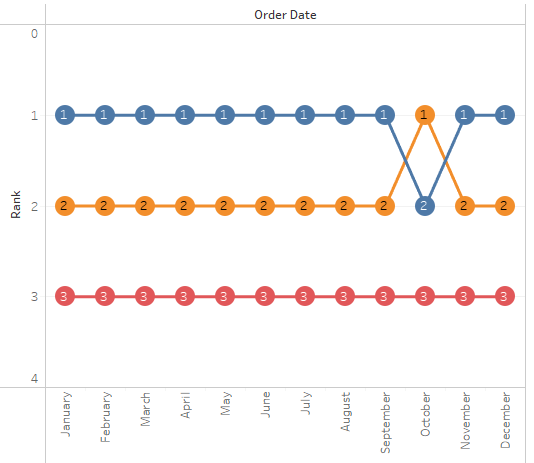
Bump Chart Tableau Note:– Overlay technique– Ranking and aggregation is calculated during plot initialization 1. “Order Date” to Columns2. “Sales” to Rows3. “Segment” to Color 4. Do “Sales” again but this time Marks Circle 5. Combine 2 plot together using Dual Axis Spotfire Note:– Can be done using line chart (w. Marker) or scatter plot…
 Kim 2 ML