
When: Sat 2024-12-07 9am – 6pm (MYT)
Where: Level 2, Menara Ken TTDI, 37, Jalan Burhanuddin Helmi, Taman Tun Dr Ismail, 60000 Kuala Lumpur, Wilayah Persekutuan Kuala Lumpur Malaysia

- Workshop: Analyze Customer Reviews with Gemini (Amrita Namblar)
- Create a “view” that anchor to a BigQuery table
- Elect a foundation modal and prompt onto the table column, generate a response column
- Summarize and visualize base on the result column
- https://www.cloudskillsboost.google/focuses/98856?parent=catalog
- https://www.cloudskillsboost.google/paths/16/course_templates/1133
- prompt template
- for each review, provide keywords from the review. Answer in JSON format with one keyword: keywords. Keywords should be a list. \n$prompt$
- Classify the sentiment of the following text as positive or negative. \n$prompt\n In your response don’t include the sentiment explanation. Remove all extraneous information from your response, it should be a boolean response either positive or negative.
- You are a marketing representative. How could we incentivise this customer with this positive review? Provide a single response, and should be simple and concise, do not include emojis. Answer in JSON format with one key: marketing. Marketing should be a string. \n$prompt$
- How would you respond to this customer review? If the customer says the coffee is weak or burnt, respond stating “thank you for the review we will provide your response to the location that you did not like the coffee and it could be improved.” Or if the review states the service is bad, respond to the customer stating, “the location they visited has been notfied and we are taking action to improve our service at that location.” From the customer reviews provide actions that the location can take to improve. The response and the actions should be simple, and to the point. Do not include any extraneous or special characters in your response. Answer in JSON format with two keys: Response, and Actions. Response should be a string. Actions should be a string. \n$prompt$
- For each image, provide a summary of what is happening in the image and keywords from the summary. Answer in JSON format with two keys: summary, keywords. Summary should be a string, keywords should be a list. \n$prompt$
- Hands-on session on Building AI Agents (Dr. Lee Mei Sin)
- Introduce RAG/Agentic framework
https://www.dagworks.io/,
https://haystack.deepset.ai/,
https://www.crewai.com/,
https://microsoft.github.io/autogen/0.2/,
https://www.langchain.com/,
https://www.llamaindex.ai/ 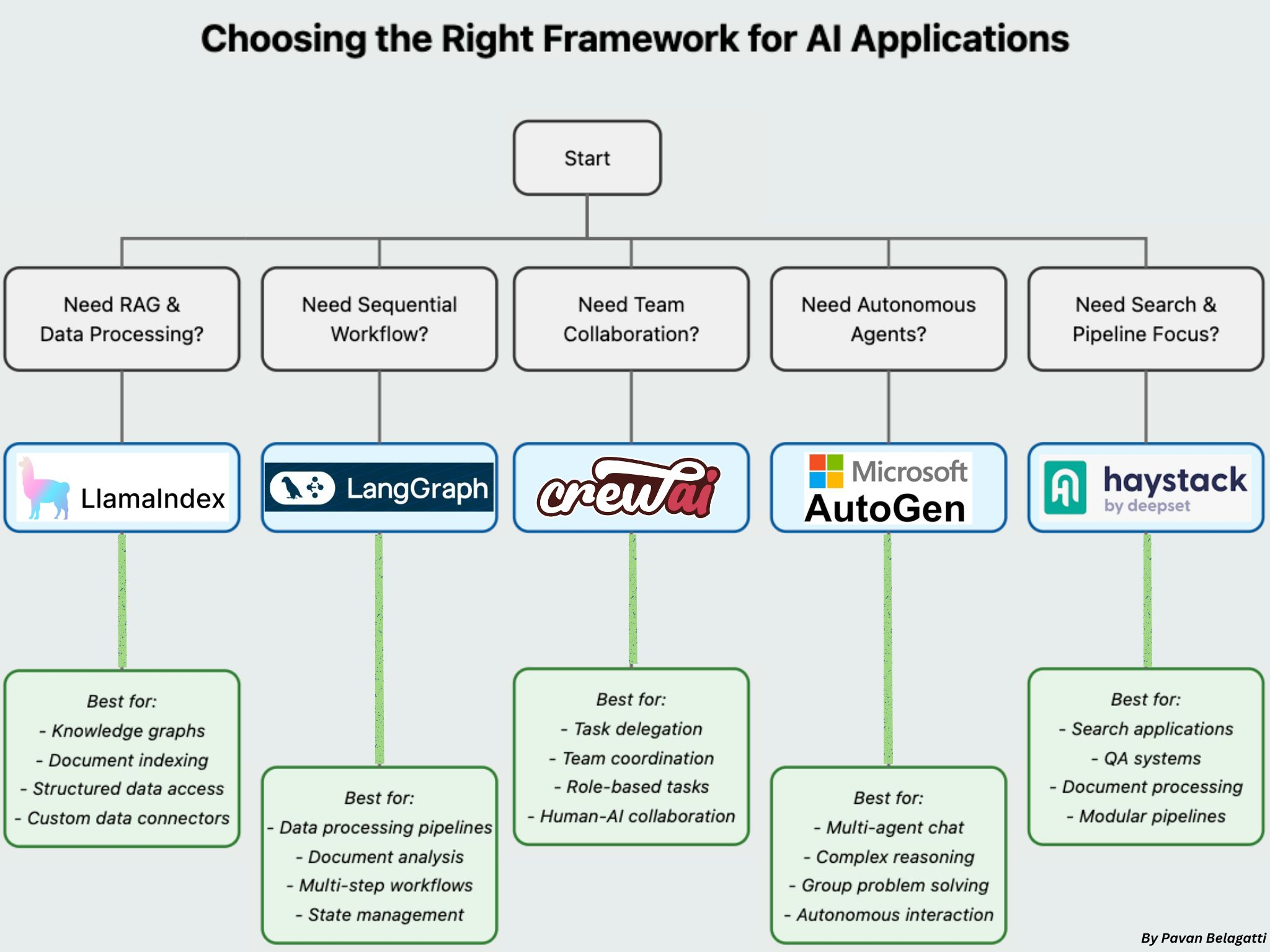
source. https://www.linkedin.com/posts/pavan-belagatti_how-to-choose-the-most-appropriate-framework-activity-7270127642400452609-gVhK/- Share script https://colab.research.google.com/drive/1lX6Mh4AT7UT9NwgqEh23ZFJm9oRUuyn5?usp=sharing#scrollTo=a41880a3-aa25-4748-8ab1-fdd2edace510
- Introduce RAG/Agentic framework
- Leaping Into The New Quantum Era: Quantum Computing with GoogleCirq (Christine Tee)
- Quantum Computer Application
- Quantum Simulation (eg: chemistry, cryptography)
- Quantum ML (with quantum data)
- Factorization (eg: Shor’s Algorithm)
- Others (eg: unstructured search, optimization)
- The Qubit Game https://quantumai.google/education/thequbitgame
- Guided Exploration https://quantumai.google/learn/map
- Qubit simulator https://justinwoodring.com/qubit-simulator/
- Quantum basic https://github.com/pytee/cirq/blob/main/basics.ipynb
- QuestionAnswer
- Qubit state is superposition but the data is zero.
- Due to superposition, the amount of memory needed would be multiplied base on the gates
- Quantum processor nor CPU nor GPU.
- Quantum Computer Application
- Introduction to Google Gen AI products (Wei Chung Low)
- ImageFX https://labs.google/fx/tools/image-fx
- MusicFX https://labs.google/fx/tools/music-fx
- NotebookLM https://notebooklm.google/
- Ideas
- each word in chat become a dropdown with suggested word, easier for user to modify prompt
- provide suggested question to be ask as a button
- Loqate
- physical address rest API verification
 Kim 2 ML
Leave a comment